Now let's modify how your page looks.
Go to Modify-->Page Properties-->Click on the box next to the words Background Color & pick a color you like.
Let's change all of the text color on the page-->click on the box next to the words Text Color & pick a color you like that will work with your new background color.
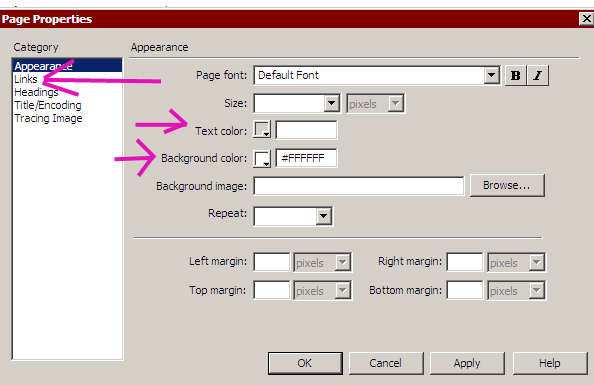
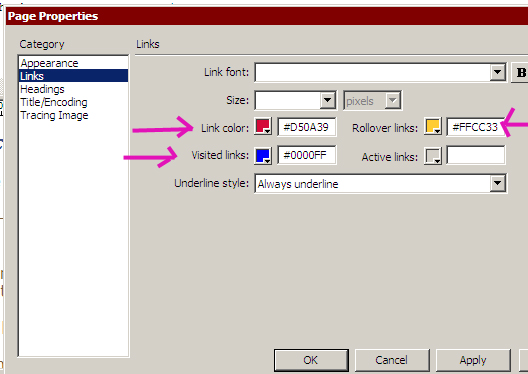
While still in this box, click on "links" in the column on the left. Note the boxes next to links, visited links, and rollover links. You can adjust the link colors so that they appear different on the page, change color after people have visited them, and change colors when people roll their cursor over them. Play around with these boxes.
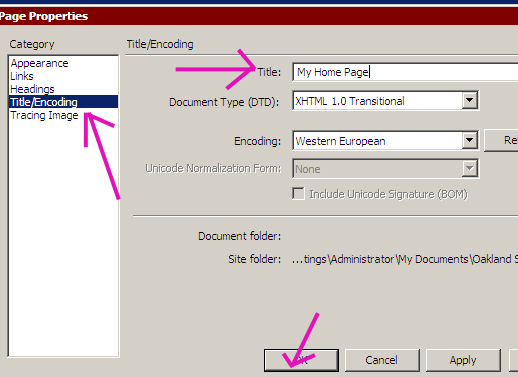
Now let's change the heading of your page (this is what will appear at the top of the browser when people visit your page...note: this page is called "Web Design 11"). Click on Title/Encoding in the left column. Where it says title, type in something like "my home page." Click "Okay."
Save & preview in browser. Check out your new page.